Custom Offset Heading allows users to enter a shift by degrees to the heading of a Path Plan. This allows the user to input a degree of offset from the current or custom heading. NOTE: This Feature requires a starting heading to be in the custom heading entry box to function.
To Enable Custom Offse Heading on a Single Path Plan:
-
Select a field and generate a Path Plan
-
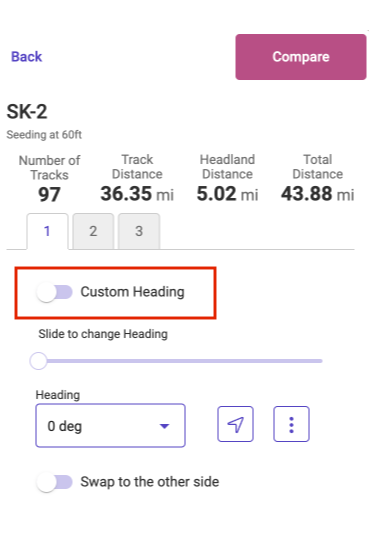
Once the Plan is in the Review stage you can toggle on Custom Heading
-
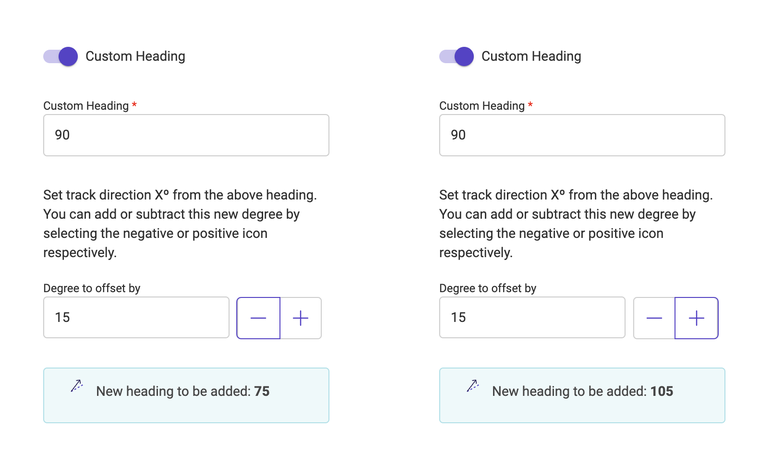
Enter a desired degree to offset by.
-
Select the Plus or Minus to enter the offset direction
-
Click the Add Button
-
This will both add the custom heading to the dropdown as a selectable heading and change the selected heading to that entered
-
Click Save
-
This will save the Path Plan with the Custom Heading entered
-
If you are editing an Existing Path Plan you will have the option to Save As a new Path Plan with the shifted heading.