Digital Terrain Model (DTM)
A Digital Terrain Model (DTM) is a three-dimensional digital representation of the earth's surface that includes information about topography and soil elevations. It is generated using geospatial data such as topographic surveys, satellite imagery, or photogrammetry.
What is the Launch Pad's Data Source?
The Launch Pad uses NASA's Digital Elevation Model (DEM).
The NASA Digital Elevation Model (DEM) is provided by the National Aeronautics and Space Administration as part of its efforts to map and monitor the Earth's surface.
For Launch Pad, the spatial resolution of the DEM is 30 m upsampled to 5 meters, which refers to the distance between data points in each horizontal direction.
The DEM is an essential tool for planning field operations, aiding in informed decision-making and optimizing various processes.
Applications of the DEM:
-
Slope Analysis:
The DEM allows you to identify areas with higher or lower slopes, which is critical for determining where planting, irrigation, or machinery traffic can be most effective and safe. High-slope areas may require special care to prevent soil erosion or damage. -
Erosion Risk Management:
By showing variations in terrain, the DEM helps identify areas vulnerable to erosion. This enables you to plan strategies to mitigate these impacts, such as implementing terraces or other soil conservation techniques.
Advantages of Launch Pad:
With Launch Pad, there’s no need to upload costly and hard-to-obtain data. The system automatically integrates NASA's DEM, making your planning more efficient. This allows you to account for area slopes, optimize operations, and help protect the soil against erosion.
Enable Slope Analysis in Your Path Plan
To view the slope of your lines in the Path Plan (whether curved or straight), simply enable the Slope option in the advanced settings when entering your Path Plan information.
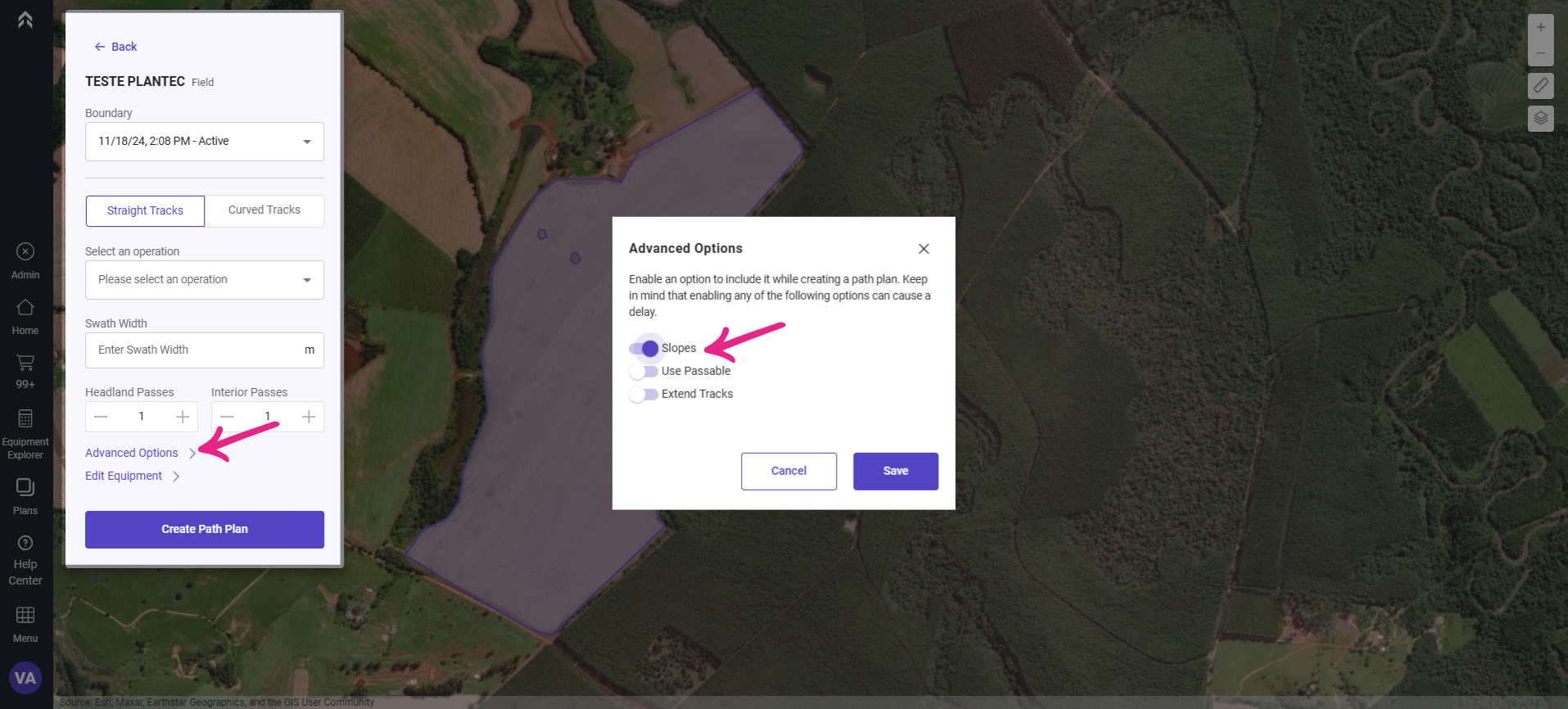
Save and create the Path Plan.
Interpretation of Results
The slope of a seeding track varies along its length as its direction changes, due to the topography.
When adjusting the direction of seeding tracks, Launch Pad automatically calculates the slope at different points along the lines, accounting for terrain variations.
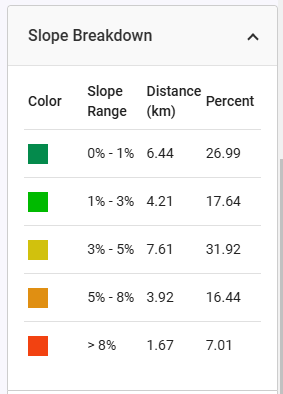
The lines generated in the Launch Pad are divided into segments, and the slope is measured for each segment. Each segment is classified into one of five slope categories, which can be reviewed in the detailed breakdown table.
The total line distance is calculated by summing the lengths of all segments in each category. The percentage indicates the proportion of samples within each slope category.
This analysis is crucial for optimizing field operation planning, enabling decisions that reduce erosion risks and improve seeding efficiency.
FAQs
1- Can I upload elevation data from machines or drones for slope analysis?
No, it’s not necessary. The Launch Pad automatically provides this information for you, using data from NASA DEM.
2- Is slope analysis useful only for curved Path Plans?
No. You can also perform straight-line Path Plans by enabling the slope option. Launch Pad will automatically display the best scenario to reduce potential soil loss due to water erosion, regardless of the type of line used.
3- W****hat is the difference between DTM and DEM?]
A DEM represents the bare-earth elevation of a surface, without any objects like vegetation, buildings, or other structures. It is a general term used for elevation data.
A DTM is a specific type of DEM that provides a more refined and accurate representation of the bare-earth surface, often enhanced with features like contour lines, and spot heights.